Home
What is Deptrac?
Deptrac is a static code analysis tool for PHP that helps you communicate, visualize and enforce architectural decisions in your projects. You can freely define your architectural layers over classes and which rules should apply to them.
For example, you can use Deptrac to ensure that bundles/modules/extensions in your project are truly independent of each other to make them easier to reuse.
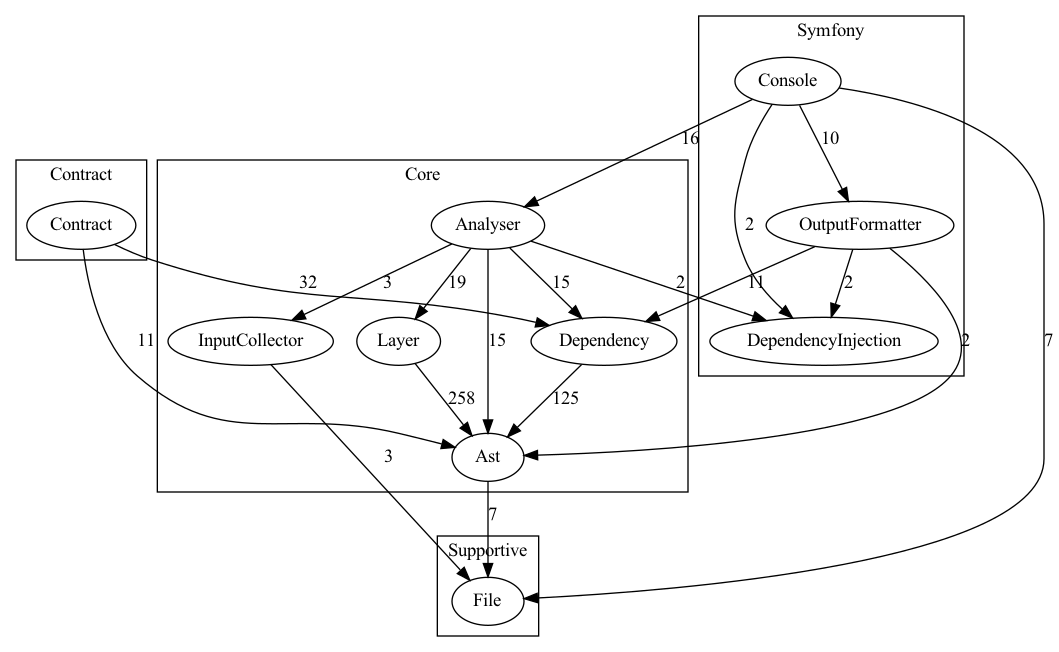
Deptrac can be used in a CI pipeline to make sure a pull request does not violate any of the architectural rules you defined. With the optional Graphviz formatter you can visualize your layers, rules and violations.
Requirements
In order to run Deptrac you need at least PHP 8.2.
You can analyse projects that require an older PHP version as long as nikic/php-parser can parse it.
Installation
You can install Deptrac via Composer using the deptrac package.
Composer
This installs the deptrac binary into your project's vendor/bin directory.
You can then run it with:
All examples in this documentation assume you run Deptrac via
vendor/bin/deptrac as described above.
Optional Dependency: Graphviz
If you want to create graphical diagrams with your class dependencies, you will
also need the dot command provided by Graphviz.
Graphviz can be installed using common package managers:
Graphviz is also available for
Windows.
Install the current stable release and append the binary path on the environment
variable Path (e.g. C:\Program Files (x86)\Graphviz2.38\bin).
Getting Started
In order to get started with Deptrac you will need a configuration file.
This configuration file is written in PHP and, by default, is stored with the
name deptrac.php in your project's root directory.
Deptrac can generate a template for you, using the init command.
The main purpose of this file is:
- Define in which directories Deptrac will search for classes and which files to exclude.
- Define your architectural layers using so-called collectors.
- Define a ruleset describing which layers can communicate with each other.
You can find out more about the Core Concepts in the docs.
Configuration
Let's have a look at the generated file:
<?php

use Deptrac\Deptrac\Contract\Config\Collector\ClassLikeConfig;
use Deptrac\Deptrac\Contract\Config\DeptracConfig;
use Deptrac\Deptrac\Contract\Config\Layer;
use Deptrac\Deptrac\Contract\Config\Ruleset;

return static function (DeptracConfig $config): void {
    $config
        ->paths('./src')
        ->excludeFiles('#.*test.*#')
        ->layers(
            $controller = Layer::withName('Controller')->collectors(
                ClassLikeConfig::create('.*Controller.*'),
            ),
            $repository = Layer::withName('Repository')->collectors(
                ClassLikeConfig::create('.*Repository.*'),
            ),
            $service = Layer::withName('Service')->collectors(
                ClassLikeConfig::create('.*Service.*'),
            ),
        )
        ->rulesets(
            Ruleset::forLayer($controller)->accesses($service),
            Ruleset::forLayer($service)->accesses($repository),
            Ruleset::forLayer($repository),
        );
};
By default, Deptrac will search your project's src/ directory for classes and
will ignore any files and directory having test in it.
We then define three layers by searching for class names in the files found by
Deptrac. Any file containing a class with Controller will be grouped in a
layer with the same name. The same happens for classes having Repository and
Service in their name. It is important to note that the fully qualified class
name is used for grouping classes. That means, the collector will take the full
namespace with class name into account.
The default ruleset will then allow classes in the Controller-layer to communicate - i.e. use classes from - the Service layer. Classes grouped in the Service layer may not use classes from the Controller layer, but they can use classes from the Repository layer. Classes inside the Repository layer may not use any classes from the other two layers.
You can learn more about the file in the Configuration reference.
Run Deptrac
Once you have set up the config file you can run Deptrac to analyse your code
and check for violations. If you use the default configuration file, you can
type vendor/bin/deptrac, otherwise you will need to specify which command and
config file should be used.
$ vendor/bin/deptrac

# which is equivalent to
$ vendor/bin/deptrac analyse --config-file=deptrac.php
If you run vendor/bin/deptrac -v you'll get a more verbose output.
The analyse command runs with a caching mechanism for parsed files by default.
This can be disabled with the --no-cache option.
The generated output will roughly look like this:
 -------------------------- --------------------------------------------------------------------------------------------------------------------------------
  Reason                     Repository
 -------------------------- --------------------------------------------------------------------------------------------------------------------------------
  DependsOnDisallowedLayer   examples\MyNamespace\Repository\SomeRepository must not depend on examples\MyNamespace\Controllers\SomeController
                             You are depending on token that is a part of a layer that you are not allowed to depend on. (Controller)
                             /Users/dbr/workspace/deptrac/deptrac/examples/ControllerServiceRepository1/SomeRepository.php:5
 -------------------------- --------------------------------------------------------------------------------------------------------------------------------


 -------------------- -----
  Report
 -------------------- -----
  Violations           1
  Skipped violations   0
  Uncovered            0
  Allowed              4
  Warnings             0
  Errors               0
 -------------------- -----
This is a report generated by Deptrac. At the top you can see a list of violations, if there are any. A violation means, that a layer uses a layer that is prohibited by the configured ruleset. In this case, a class from the Repository layer uses a class from the Controller layer.
The table on the bottom gives you an overview over:
- how many violations were found.
- how many violations were skipped, meaning your config contains exceptions. which will not cause Deptrac to return with an error status code, e.g. in CI, when these violations are found.
- how many classes were found in the directories, that were not assigned to a layer.
- how many usages between layers were found that do not violate the ruleset.
- how many warnings where encountered, e.g. because a class is grouped in multiple layers.
- how many errors were encountered, e.g. when you exclude a violation in your config file but that violation is not encountered.
If the output does not match your expectations please take a look at the debugging commands available in Deptrac.
You can also change the output format itself by using one of the many provided Output Formatters.
Contribute
Deptrac is in active development. We are looking for your suggestions and help to make it better.
Feel free to open an issue if you encounter bugs, have suggestions or would like to add a new feature to Deptrac.
Please feel free to improve this documentation, fix bugs, or work on a suggested feature by making a pull request on GitHub. Don't hesitate to ask for support, if you need help at any point.
The Contribution Guide in the documentation contains some advice for making a pull request with code changes.
Code of Conduct
If you are professional and polite then everything will be alright.
Please don't be inconsiderate or mean, or anything in between.
Further Documentation
- Backwards Compatibility - General info on how we approach backwards compatibility
- Upgrade Guide - List of backwards breaking changes that need to be addressed when upgrading Deptrac to a new version and how to do it.
- Core Concepts - Explains layers, rules and violations in more details.
- Configuration - Reference for all available settings in a config file
- Collectors - Reference for which collectors are available in Deptrac to define your layers.
- Formatters - Lists the different output formats supported by Deptrac
- Debugging - Overview of the debug commands
- Code Of Conduct - Our community standards
- Contribute - Advice for contributing code changes, e.g. how to run tests or how to use your local changes to analyse your projects
- Security Guide - How to report security vulnerabilities